Tuesday, April 9, 2024

Generate Elmer FEM solver scripts using WELSIM

 Elmer FEM is an excellent open-source finite element software for general-purpose multi-physics simulations. It is being developed through collaboration between CSC, Finnish universities, research laboratories, and the industry. The Elmer solver is based on the GPL open-source license and is capable of computing various physical models including fluid dynamics, structural mechanics, electromagnetics, heat transfer, and acoustics. Elmer FEM can run on both Windows and Linux operating systems; has been widely used in academic and industrial settings. The latest version is 9.0, and the official release includes all the source code along with extensive examples and documentation. Installation packages are also provided for easy setup.

Elmer FEM solver files have a relatively independent format that is concise and easy to learn. These files typically consist of a single file with the extension *.sif. Mesh data is composed of four additional mesh files.

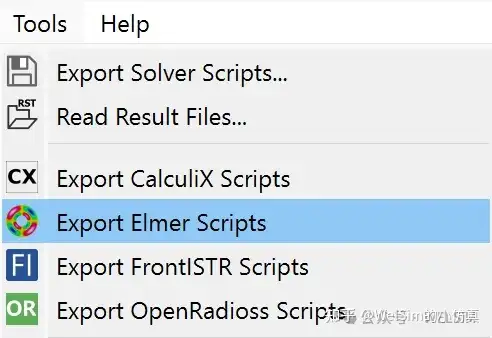
To better support the open-source and simulation community, WELSIM recently added pre-processing abilities for Elmer FEM, allowing users to quickly generate input scripts required for Elmer FEM computation. After defining the model, users can select the option to output Elmer FEM files from the Tools menu, resulting in solver files in the specified directory.

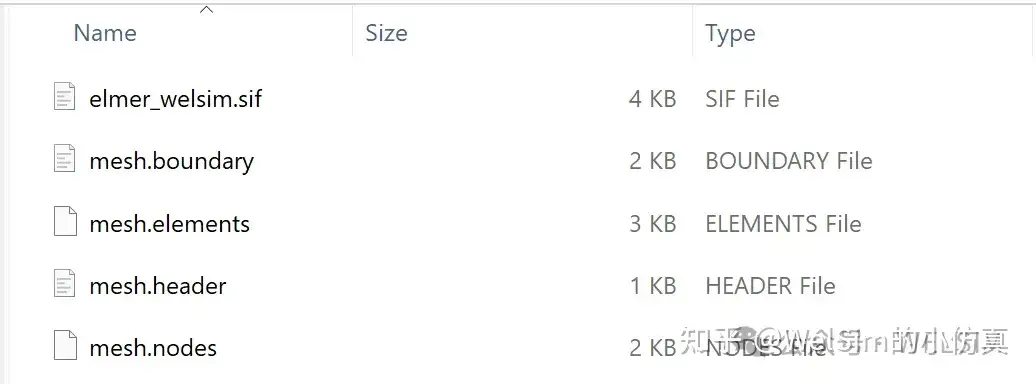
Upon successful export, a solver input script named elmer_welsim.sif is generated along with four mesh files named mesh.header, mesh.nodes, mesh.elements, and mesh.boundary.

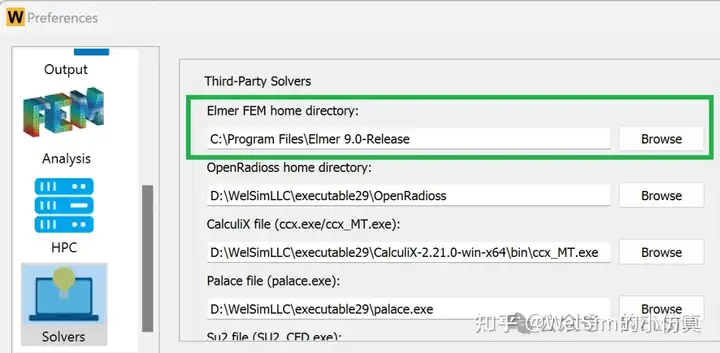
Additionally, WELSIM can directly invoke Elmer FEM for computation. After downloading Elmer FEM solver files, users can configure the path to the solver directory through Preferences -> Solver -> Elmer FEM executable file. This enables direct invocation of Elmer FEM to solve the model and obtain result files.

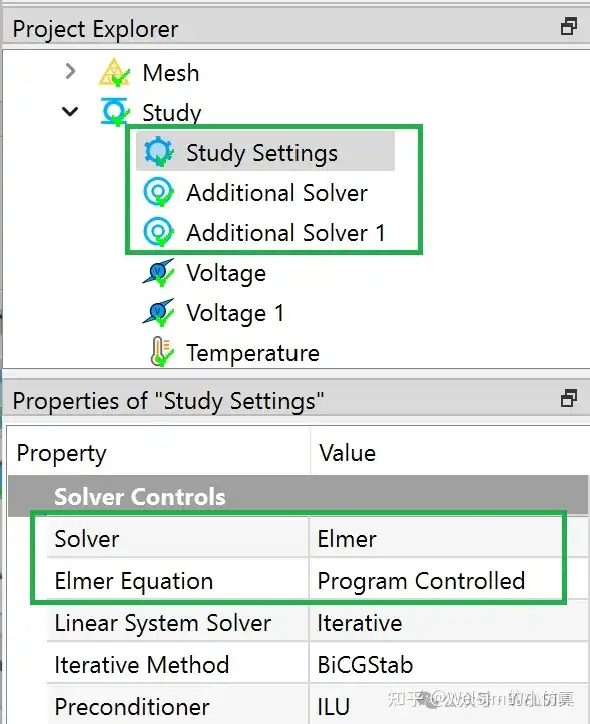
Since Elmer FEM is not the default solver for WELSIM, when performing the connected computing, the solver property of the Study Settings object needs to be set to Elmer FEM. Considering the various equation types within Elmer FEM, additional Elmer Equation properties are provided to specify specific computational formulas. Currently, Elmer Equation options support common formulas such as Coil Solver, Fluidic Force, Free Surface Reduced, Heat Equation, MagnetoDynamics, Mesh Update, Navier-Stokes, Poisson BEM, Save Line, Save Scalars, Static Electrical Solver, Static Current Solver, Stress Analysis, Stream Solver, etc.

Elmer FEM supports multiple different types of solvers within a single analysis. To use this feature, a new Additional Solver object is introduced, allowing users to add an unlimited number of solver settings. The properties of the Additional Solver node are similar to the solver settings in Study Settings.

MatEditor outputs Elmer scripts

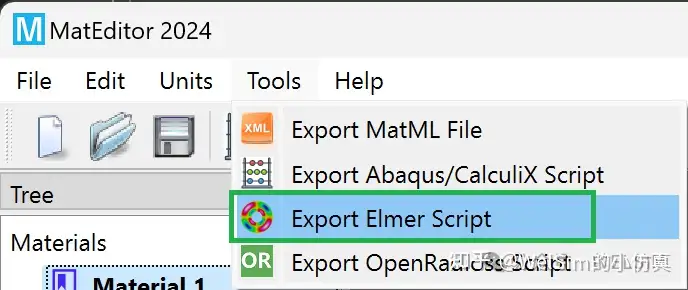
In addition to WELSIM, the standalone material editing software MatEditor supports the export of Elmer FEM material data. The generated material data can be directly used in Elmer solver input files.

Conclusion

This article introduces the generation of Elmer FEM solver scripts using WELSIM and how to set up combined simulations. Thanks to its excellent GUI, users can quickly generate high-quality Elmer FEM files.

Currently, WELSIM only supports Tet4, Tet10, Tri3, and Tri6 elements. WELSIM does not support multi-domain mesh with shared boundaries.

Elmer FEM is distributed under the GPL open-source license, and the installer of WELSIM does not include the Elmer FEM solver. Users need to download and install the solver themselves. With simple configuration, WELSIM can be used for calling Elmer FEM to run the generated scripts.

The functionality of Elmer FEM input files has been developed in the 2024R2 beta version, and it will be continuously enhanced in subsequent versions. For support of other open-source solvers, references can be made to articles such as “Generating CalculiX Solver Files with WELSIM”, “Generating SU2 Solver Files with WELSIM”, “Using WELSIM to Invoke OpenRadioss for Explicit Dynamics Analysis”, “Generating FrontISTR Mesh and Input Files with WELSIM”, “Generating Initial Mesh Files for MFEM with WELSIM”, and “Generating Solver Files for Electromagnetic Calculation Software Palace with WELSIM”.

WELSIM and the author are not affiliated with Elmer FEM. Elmer FEM is used only as a nominative reference to the open-source project and software developed and released by these teams or institutions.

Saturday, April 6, 2024

使用WELSIM生成Elmer FEM求解器输入文件

Elmer FEM是一款优秀的通用开源多物理场有限元软件,它由CSC与芬兰大学、研究实验室和工业界合作开发。Elmer求解器基于GPL开源协议,能够计算包括流体动力学、结构力学、电磁学、热传递和声学等物理模型。可以在Windows和Linux操作系统上运行,Elmer FEM已经广泛用于学术与工业界。目前最新的版本是9.0,官方开源了全部代码,同时提供了大量实例与文档。同时提供了安装包,可以直接安装使用。

Elmer FEM求解器文件有着相对独立的格式,但格式简洁明了,易于学习。文件通常是单个文件,后缀名为*.sif。网格数据是由另外4个网格文件组成。

为了更好的支持开源求解器与仿真社区,WELSIM近期支持了Elmer FEM的前处理,用户可以快速的生成Elmer FEM计算所需的输入文件。用户在定义完模型后,在菜单栏的工具(Tools)选项中,选择输出Elmer FEM文件,即可在指定目录得到求解器文件。

导出成功后,会生成名为elmer_welsim.sif的求解器输入文件,和由四个文件组成的网格文件,分别名为mesh.header, mesh.nodes, mesh.elements, mesh.boundary。

同时,WELSIM可以直接调用Elmer FEM进行计算。当下载Elmer FEM求解器文件后,可以通过首选项 – 求解器 - Elmer FEM可执行文件,来配置求解器目录的路径。通过这种方式,可以直接调用Elmer FEM,求解模型,得到结果文件。

由于Elmer FEM不是默认的求解器,当进行联合求解时,需要将分析设置节点(Study Settings)的求解器属性设定为Elmer FEM。Elmer FEM的求解器类型较多,因此提供了额外的Elmer Equation属性,用于指定具体计算公式。目前Elmer Equation选项已经支持常用的公式,如Coil Solver, Fluidic Force, Free Surface Reduced, Heat Equation, MagnetoDynamics, Mesh Update, Navier-Stokes, Poisson BEM, Save Line, Save Scalars, Static Electrical Solver, Static Current Solver, Stress Analysis, Stream Solver等。

Elmer FEM在一个分析中支持多个不同类型的求解器,为支持这个特点,引入了新的Additional Solver节点,用于支持用户添加无限多个求解器设置。Additional Solver节点属性和Study Settings中的求解器设置类似。

MatEditor输出Elmer FEM材料命令

除WELSIM外,独立的材料编辑软件MatEditor也支持Elmer FEM材料数据的导出。生成的材料数据可以直接用于Elmer求解器输入文件。

总结

本文介绍了使用WELSIM生成Elmer FEM计算文件,和联合求解的设置。得益于优异的GUI,用户可以快速生成高质量的Elmer FEM文件。

目前WELSIM只支持Tet4, Tet10, Tri3, Tri6单元。尚不支持含有共享边界的多区域网格。

Elmer FEM使用GPL开源协议,WELSIM的安装包中不含Elmer FEM求解器。用户需要自行下载安装求解器。通过简单配置,即可使用WELSIM与Elmer FEM联合求解工程问题。

Elmer FEM输入文件的功能已经在2024R2中开发版中,会在正式版和以后的版本中不断维护与增强。其他开源求解器的支持,可以参考《使用WELSIM生成CalculiX求解器文件》、《使用WELSIM生成SU2求解器文件》,《使用WELSIM调用OpenRadioss进行显示动力学分析》,《使用WelSim生成FrontISTR网格与输入文件》,《使用WELSIM生成MFEM初始网格文件》,《使用WELSIM生成电磁计算软件Palace的求解器文件》。

WelSim与作者不隶属于Elmer FEM。和Elmer FEM开发团队与机构没有直接关系。这里引用Elmer FEM仅用作技术博客文章与软件使用的参考。

Friday, March 22, 2024

Generate CalculiX solver files using WELSIM

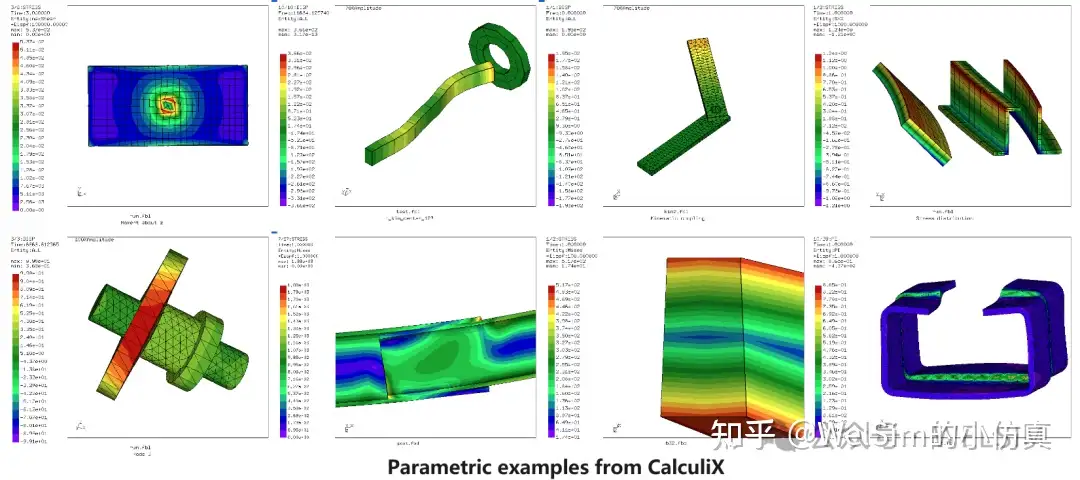
 CalculiX is an outstanding general-purpose open-source finite element software based on the GPL open-source license, which can run on both Windows and Linux operating systems. The solver supports a variety of element types, analysis types, and also parallel processing. It can compute static, transient, fluid, thermal, and other models. Overall, CalculiX has excellent solving performance, and it has been widely used in academia and industry. The latest version is 2.21. The code for the program is all open-sourced, while also providing compiled executable programs and numerous examples.

CalculiX solver input files have a concise and clear format that is easy to learn, similar to Abaqus format. The file extension can be arbitrary, but `.inp` is commonly used. The input files can be a single file or divided into multiple files. The author prefers the input method of two files, one being a mesh file defining all mesh-related data; the other being a control command file containing material, load steps, parameters, etc.

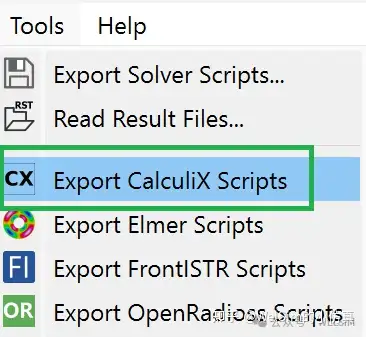
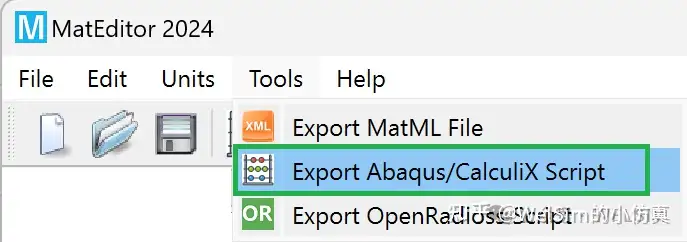
In order to better support the open-source solver and simulation community, WELSIM recently added CalculiX preprocessing abilities. Users can quickly generate input files required for CalculiX computation. After defining the model, users can select the “Export CalculiX Scripts” option in the Tools menu bar to obtain solver files in the specified directory.

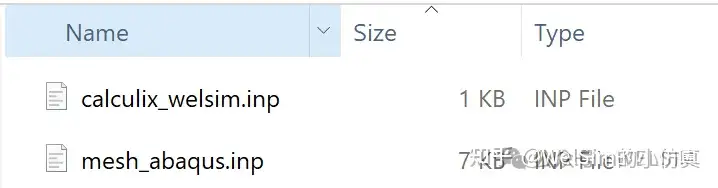
Upon successful export, two solver files will be generated, where the solver input script, `calculix_welsim.inp`, calls the mesh file named `mesh_abaqus.inp` using the *INCLUDE command.

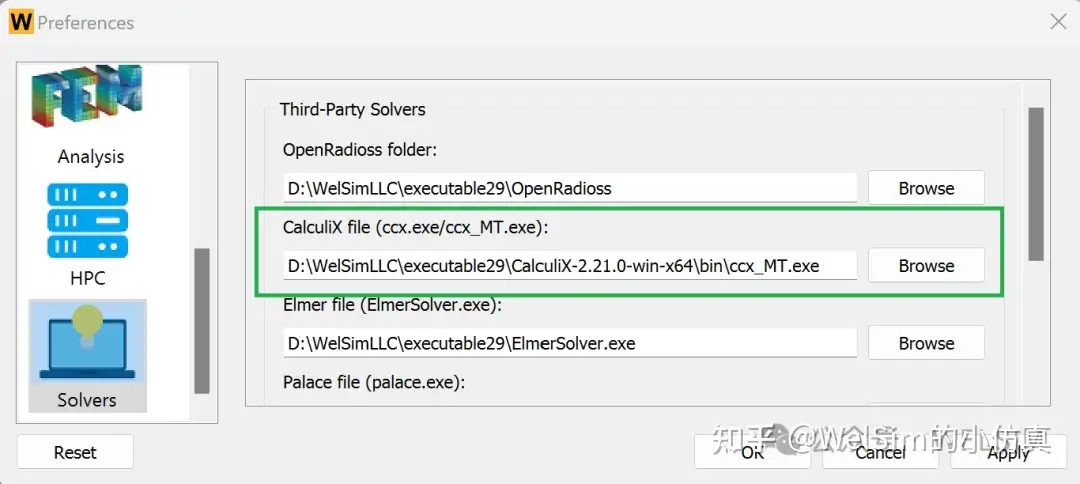
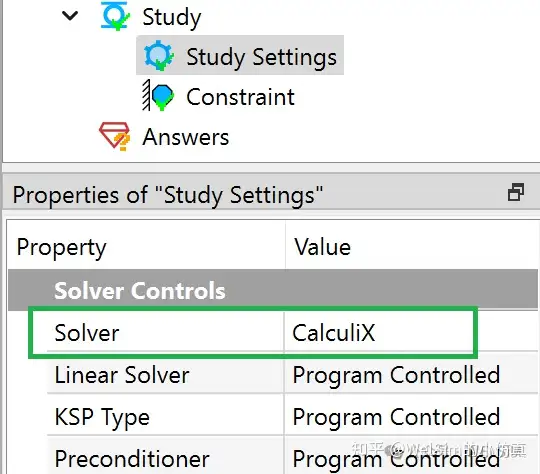
Additionally, WELSIM can directly invoke CalculiX for computation. After downloading the CalculiX solver files, users can configure the path of the solver `ccx.exe` or `ccx_MT.exe` through Preferences -> Solver -> CalculiX executable file. After defining the model, users can directly solve it and obtain the result files.

Since CalculiX is not the default solver for WELSIM, when performing integrated analysis, the Solver property of the Analysis Settings object need to be set to CalculiX. CalculiX’s load step settings are more flexible, so WELSIM provides more setting properties in each load step.

Supported Commands

The latest version of CalculiX has a total of 141 commands. Currently, WELSIM already supports 60 commands, accounting for 42% of all commands, all of which are core commands and meet common analysis needs. Supported commands include:

Control commands:
*AMPLITUDE
*BEAM SECTION
*CFD
*COMPLEX FREQUENCY
*DYNAMIC
*ELECTROMAGNETICS
*EL FILE
*EL PRINT
*END STEP
*FREQUENCY
*FRICTION
*HEADING
*HEAT TRANSFER
*INCLUDE
*NODE FILE
*NODE PRINT
*FLUID CONSTANTS
*PHYSICAL CONSTANTS
*REFINE MESH
*RIGID BODY
*STATIC
*STEADY STATE DYNAMICS
*STEP

Contact, initial, and boundary conditions:
*BOUNDARY
*CFLUX
*CLOAD
*CONSTRAINT
*CONTACT PAIR
*DFLUX
*DLOAD
*DSLOAD
*FILM
*INITIAL CONDITIONS
*MASS FLOW
*RADIATE

Mesh commands:
*ELEMENT
*ELSET
*EQUATION
*FLUID SECTION
*MASS
*NODE
*NSET
*SHELL SECTION
*SOLID SECTION
*SURFACE

Material commands:
*CONDUCTIVITY
*CREEP
*CYCLIC HARDENING
*DAMPING
*DEFORMATION PLASTICITY
*DENSITY
*ELASTIC
*ELECTRICAL CONDUCTIVITY
*EXPANSION
*HYPERELASTIC
*MAGNETIC PERMEABILITY
*MATERIAL
*PLASTIC
*RATE DEPENDENT
*SPECIFIC GAS CONSTANT
*SPECIFIC HEAT

MatEditor outputs CalculiX scripts

Apart from WELSIM, the independent material editing software MatEditor also supports the export of CalculiX material data. Since Abaqus and CalculiX material commands are consistent, the exported material data text can be used for both CalculiX and Abaqus.

Conclusion

This article introduces how to generate CalculiX input scripts using WELSIM and the settings for integrated analysis. Thanks to its excellent GUI, users can quickly generate high-quality CalculiX scripts.

Currently, WELSIM only supports Tet4, Tet10, Tri3, Tri6 elements, and the output CalculiX elements only support C3D4, C3D10, F3D4, DC3D4, DC3D10, S3, S6, B21, B32, T2D2, T3D3.

CalculiX is under the GPL open-source license, however the WELSIM installer package does not include the CalculiX solver. Users need to download the solver themselves. With simple configuration, WELSIM can be used to solve engineering problems in conjunction with CalculiX.

The functionality of CalculiX scripts has been introduced in WELSIM’s 2024R2 development version. It will be continuously maintained and enhanced in official releases and future versions.

WELSIM and the author are not affiliated with CalculiX, or Abaqus. CalculiX and Abaqus are used only as a nominative reference to the open-source project and software developed and released by these teams or institutions.
Monday, March 18, 2024

使用WELSIM生成CalculiX求解器文件

CalculiX是一款优秀的通用开源有限元软件,基于GPL开源协议,可以在Windows和Linux操作系统上运行。求解器支持丰富的单元类型,多种求解类型,优秀的求解性能,支持并行处理等,可计算静态、瞬态、流体和热等模型。CalculiX已经广泛用于学术与工业界。目前最新的版本是2.21,项目方开源了全部代码,同时提供了编译后的可执行程序和大量实例。

CalculiX求解器输入文件与Abaqus格式相似,格式简洁明了,易于学习。文件后缀名可以任意,但常用*.inp。可以是单个文件,也可以分为多个文件。笔者倾向于使用两个文件的输入方式,一个网格文件,定义网格相关所有信息。另一个控制命令文件,含有材料,载荷步,参数等信息。

为了更好的支持开源求解器与仿真社区,WELSIM近期支持了CalculiX的前处理,用户可以快速的生成CalculiX计算所需的输入文件。用户在定义完模型后,在菜单栏的工具(Tools)选项中,选择输出CalculiX文件,即可在指定目录得到求解器文件。

导出成功后,会生成两个求解器,calculix_welsim.inp是求解器输入文件,其中通过*INCLUDE命令,调用名为mesh_abaqus.inp的网格文件。

同时,WELSIM可以直接调用CalculiX进行计算。当下载CalculiX求解器文件后,可以通过首选项 – 求解器 - CalculiX可执行文件,来配置求解器ccx.exe或ccx_MT.exe的路径。定义好模型后,可以直接求解,并得到结果文件。

由于CalculiX不是默认的求解器,当进行联合求解时,需要将分析设置节点(Study Settings)的求解器属性设定为CalculiX。CalculiX的载荷步设置更为灵活,因此WELSIM在每个载荷步内提供更多的分析设置。


已经支持的命令

最新版的CalculiX共有141个命令,目前WELSIM已经支持了60个命令,占全部命令的42%,且全部为核心命令,已经满足常用的分析。支持的命令如下。

控制命令:

  • AMPLITUDE:
  • BEAM SECTION
  • CFD
  • COMPLEX FREQUENCY
  • DYNAMIC
  • ELECTROMAGNETICS
  • EL FILE
  • EL PRINT
  • END STEP
  • FREQUENCY
  • FRICTION
  • HEADING
  • HEAT TRANSFER
  • INCLUDE
  • NODE FILE
  • NODE PRINT
  • FLUID CONSTANTS
  • PHYSICAL CONSTANTS
  • REFINE MESH
  • RIGID BODY
  • STATIC
  • STEADY STATE DYNAMICS
  • STEP

接触、初始与边界等条件:

  • BOUNDARY
  • CFLUX
  • CLOAD
  • CONSTRAINT
  • CONTACT PAIR
  • DFLUX
  • DLOAD
  • DSLOAD
  • FILM
  • INITIAL CONDITIONS
  • MASS FLOW
  • RADIATE

网格命令:

  • ELEMENT
  • ELSET
  • EQUATION
  • FLUID SECTION
  • MASS
  • NODE
  • NSET
  • SHELL SECTION
  • SOLID SECTION
  • SURFACE

材料命令:

  • CONDUCTIVITY
  • CREEP
  • CYCLIC HARDENING
  • DAMPING
  • DEFORMATION PLASTICITY
  • DENSITY
  • ELASTIC
  • ELECTRICAL CONDUCTIVITY
  • EXPANSION
  • HYPERELASTIC
  • MAGNETIC PERMEABILITY
  • MATERIAL
  • PLASTIC
  • RATE DEPENDENT
  • SPECIFIC GAS CONSTANT
  • SPECIFIC HEAT

MatEditor输出CalculiX材料命令

除WELSIM外,独立的材料编辑软件MatEditor也支持CalculiX材料数据的导出。由于Abaqus与CalculiX材料命令一致,导出的材料数据文本既可以用于CalculiX,也可以用于Abaqus。

总结

本文介绍了使用WELSIM生成CalculiX计算文件,和联合求解的设置。得益于优异的GUI,用户可以快速生成高质量的CalculiX文件。

目前WELSIM只支持Tet4, Tet10, Tri3, Tri6单元,输出的CalculiX单元仅支持C3D4, C3D10, F3D4, DC3D4, DC3D10, S3, S6,B21, B32, T2D2, T3D3。

CalculiX使用GPL开源协议,WELSIM的安装包中不含CalculiX求解器。用户需要自行下载求解器。通过简单配置,即可使用WELSIM与CalculiX联合求解工程问题。

CalculiX输入文件的功能已经在2024R2中开发版中,会在正式版和以后的版本中不断维护与增强。其他开源求解器的支持,可以参考《使用WELSIM生成SU2求解器文件》,《使用WELSIM调用OpenRadioss进行显示动力学分析》,《使用WelSim生成FrontISTR网格与输入文件》,《使用WELSIM生成MFEM初始网格文件》,《使用WELSIM生成电磁计算软件Palace的求解器文件》。

WelSim与作者不隶属于CalculiX和Abaqus。和CalculiX、Abaqus开发团队与机构没有直接关系。这里引用CalculiX仅用作技术博客文章与软件使用的参考。