Elmer FEM is an excellent open-source finite element software for general-purpose multi-physics simulations. It is being developed through collaboration between CSC, Finnish universities, research laboratories, and the industry. The Elmer solver is based on the GPL open-source license and is capable of computing various physical models including fluid dynamics, structural mechanics, electromagnetics, heat transfer, and acoustics. Elmer FEM can run on both Windows and Linux operating systems; has been widely used in academic and industrial settings. The latest version is 9.0, and the official release includes all the source code along with extensive examples and documentation. Installation packages are also provided for easy setup.
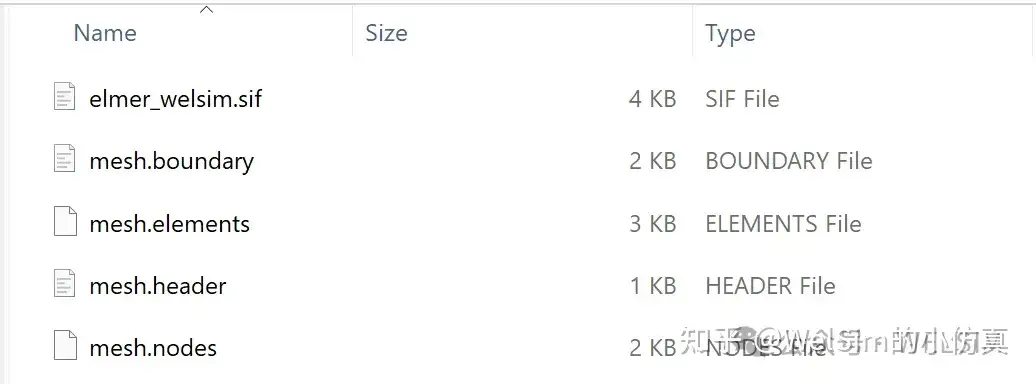
Elmer FEM solver files have a relatively independent format that is concise and easy to learn. These files typically consist of a single file with the extension *.sif. Mesh data is composed of four additional mesh files.
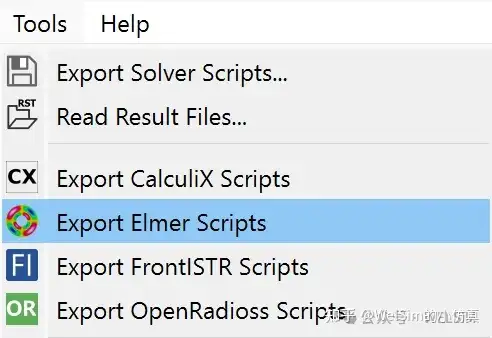
To better support the open-source and simulation community, WELSIM recently added pre-processing abilities for Elmer FEM, allowing users to quickly generate input scripts required for Elmer FEM computation. After defining the model, users can select the option to output Elmer FEM files from the Tools menu, resulting in solver files in the specified directory.
Upon successful export, a solver input script named elmer_welsim.sif is generated along with four mesh files named mesh.header, mesh.nodes, mesh.elements, and mesh.boundary.
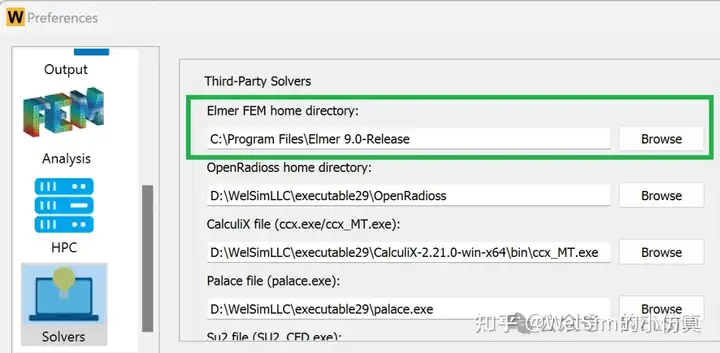
Additionally, WELSIM can directly invoke Elmer FEM for computation. After downloading Elmer FEM solver files, users can configure the path to the solver directory through Preferences -> Solver -> Elmer FEM executable file. This enables direct invocation of Elmer FEM to solve the model and obtain result files.
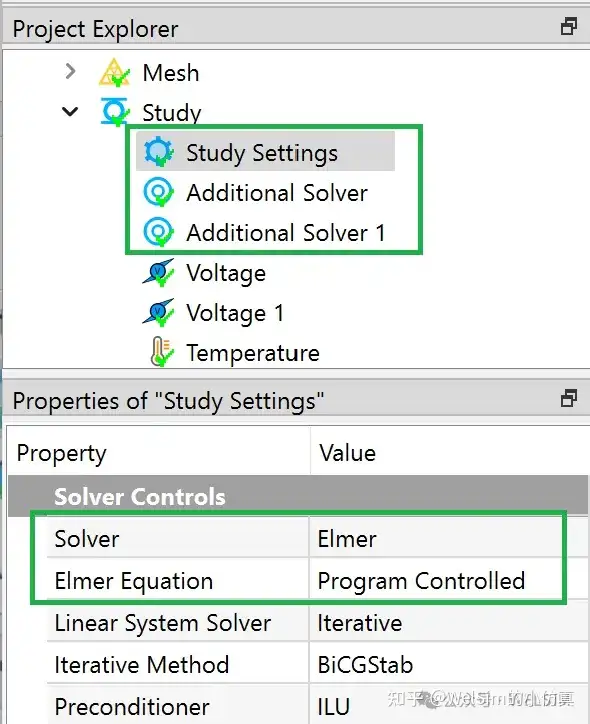
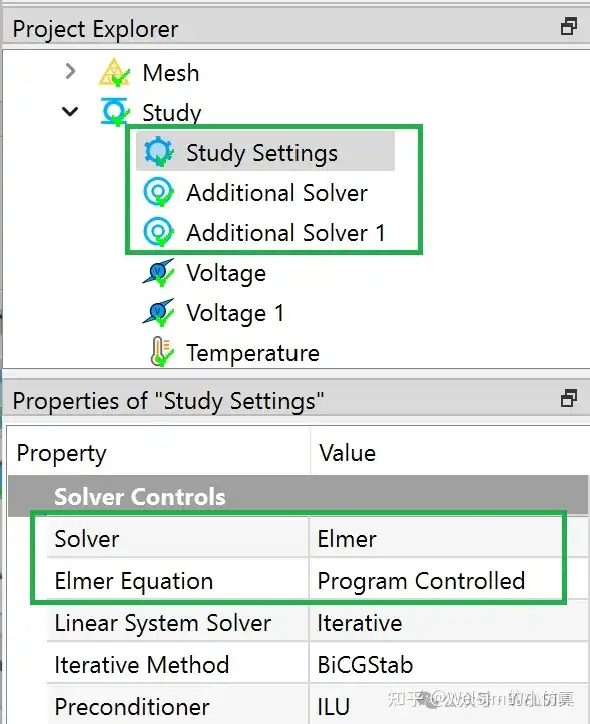
Since Elmer FEM is not the default solver for WELSIM, when performing the connected computing, the solver property of the Study Settings object needs to be set to Elmer FEM. Considering the various equation types within Elmer FEM, additional Elmer Equation properties are provided to specify specific computational formulas. Currently, Elmer Equation options support common formulas such as Coil Solver, Fluidic Force, Free Surface Reduced, Heat Equation, MagnetoDynamics, Mesh Update, Navier-Stokes, Poisson BEM, Save Line, Save Scalars, Static Electrical Solver, Static Current Solver, Stress Analysis, Stream Solver, etc.
Elmer FEM supports multiple different types of solvers within a single analysis. To use this feature, a new Additional Solver object is introduced, allowing users to add an unlimited number of solver settings. The properties of the Additional Solver node are similar to the solver settings in Study Settings.
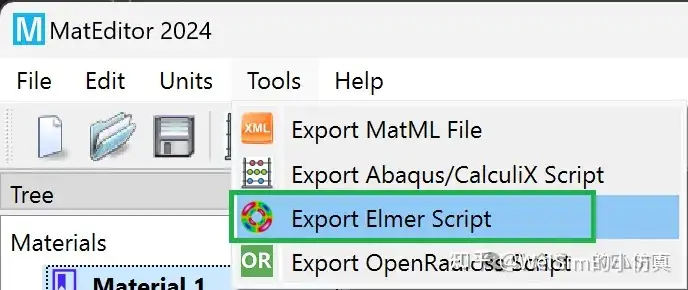
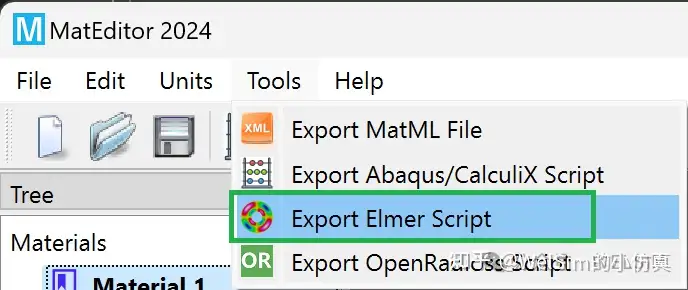
MatEditor outputs Elmer scripts
In addition to WELSIM, the standalone material editing software MatEditor supports the export of Elmer FEM material data. The generated material data can be directly used in Elmer solver input files.
Conclusion
This article introduces the generation of Elmer FEM solver scripts using WELSIM and how to set up combined simulations. Thanks to its excellent GUI, users can quickly generate high-quality Elmer FEM files.
Currently, WELSIM only supports Tet4, Tet10, Tri3, and Tri6 elements. WELSIM does not support multi-domain mesh with shared boundaries.
Elmer FEM is distributed under the GPL open-source license, and the installer of WELSIM does not include the Elmer FEM solver. Users need to download and install the solver themselves. With simple configuration, WELSIM can be used for calling Elmer FEM to run the generated scripts.
The functionality of Elmer FEM input files has been developed in the 2024R2 beta version, and it will be continuously enhanced in subsequent versions. For support of other open-source solvers, references can be made to articles such as “Generating CalculiX Solver Files with WELSIM”, “Generating SU2 Solver Files with WELSIM”, “Using WELSIM to Invoke OpenRadioss for Explicit Dynamics Analysis”, “Generating FrontISTR Mesh and Input Files with WELSIM”, “Generating Initial Mesh Files for MFEM with WELSIM”, and “Generating Solver Files for Electromagnetic Calculation Software Palace with WELSIM”.
WELSIM and the author are not affiliated with Elmer FEM. Elmer FEM is used only as a nominative reference to the open-source project and software developed and released by these teams or institutions.
CalculiX is an outstanding general-purpose open-source finite element software based on the GPL open-source license, which can run on both Windows and Linux operating systems. The solver supports a variety of element types, analysis types, and also parallel processing. It can compute static, transient, fluid, thermal, and other models. Overall, CalculiX has excellent solving performance, and it has been widely used in academia and industry. The latest version is 2.21. The code for the program is all open-sourced, while also providing compiled executable programs and numerous examples.
CalculiX solver input files have a concise and clear format that is easy to learn, similar to Abaqus format. The file extension can be arbitrary, but `.inp` is commonly used. The input files can be a single file or divided into multiple files. The author prefers the input method of two files, one being a mesh file defining all mesh-related data; the other being a control command file containing material, load steps, parameters, etc.
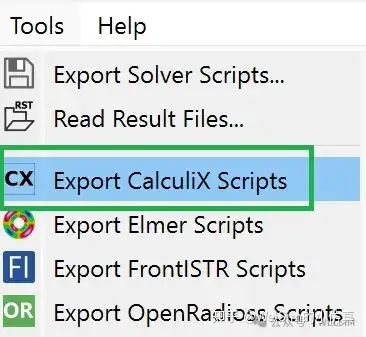
In order to better support the open-source solver and simulation community, WELSIM recently added CalculiX preprocessing abilities. Users can quickly generate input files required for CalculiX computation. After defining the model, users can select the “Export CalculiX Scripts” option in the Tools menu bar to obtain solver files in the specified directory.
Upon successful export, two solver files will be generated, where the solver input script, `calculix_welsim.inp`, calls the mesh file named `mesh_abaqus.inp` using the *INCLUDE command.
Additionally, WELSIM can directly invoke CalculiX for computation. After downloading the CalculiX solver files, users can configure the path of the solver `ccx.exe` or `ccx_MT.exe` through Preferences -> Solver -> CalculiX executable file. After defining the model, users can directly solve it and obtain the result files.
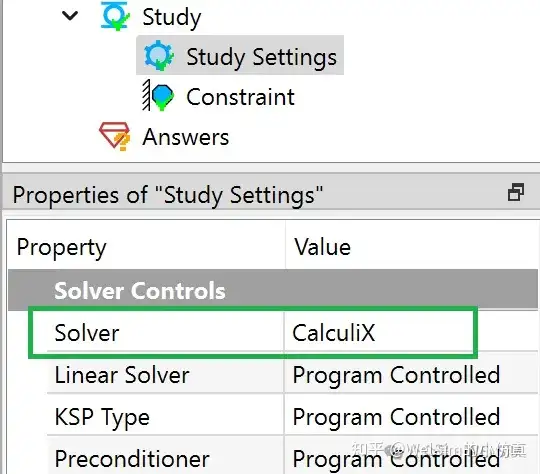
Since CalculiX is not the default solver for WELSIM, when performing integrated analysis, the Solver property of the Analysis Settings object need to be set to CalculiX. CalculiX’s load step settings are more flexible, so WELSIM provides more setting properties in each load step.
Supported Commands
The latest version of CalculiX has a total of 141 commands. Currently, WELSIM already supports 60 commands, accounting for 42% of all commands, all of which are core commands and meet common analysis needs. Supported commands include:
Control commands: *AMPLITUDE *BEAM SECTION *CFD *COMPLEX FREQUENCY *DYNAMIC *ELECTROMAGNETICS *EL FILE *EL PRINT *END STEP *FREQUENCY *FRICTION *HEADING *HEAT TRANSFER *INCLUDE *NODE FILE *NODE PRINT *FLUID CONSTANTS *PHYSICAL CONSTANTS *REFINE MESH *RIGID BODY *STATIC *STEADY STATE DYNAMICS *STEP
Apart from WELSIM, the independent material editing software MatEditor also supports the export of CalculiX material data. Since Abaqus and CalculiX material commands are consistent, the exported material data text can be used for both CalculiX and Abaqus.
Conclusion
This article introduces how to generate CalculiX input scripts using WELSIM and the settings for integrated analysis. Thanks to its excellent GUI, users can quickly generate high-quality CalculiX scripts.
Currently, WELSIM only supports Tet4, Tet10, Tri3, Tri6 elements, and the output CalculiX elements only support C3D4, C3D10, F3D4, DC3D4, DC3D10, S3, S6, B21, B32, T2D2, T3D3.
CalculiX is under the GPL open-source license, however the WELSIM installer package does not include the CalculiX solver. Users need to download the solver themselves. With simple configuration, WELSIM can be used to solve engineering problems in conjunction with CalculiX.
The functionality of CalculiX scripts has been introduced in WELSIM’s 2024R2 development version. It will be continuously maintained and enhanced in official releases and future versions.
WELSIM and the author are not affiliated with CalculiX, or Abaqus. CalculiX and Abaqus are used only as a nominative reference to the open-source project and software developed and released by these teams or institutions.