Monday, March 10, 2025

Defining Multi-Layered Composite Structure in Finite Element Analysis

 In modern structural analysis, multi-layer composite materials are often encountered. These composites frequently appear as a complete shell structure, made up of multiple layers stacked on top of each other. The angles, thicknesses, and materials of the layers may all vary. For the analysis of such composite materials, simulation software needs to provide relevant features, with users inputting data based on the actual materials.

The WELSIM composite parameter input provides a simplified method. This article introduces the steps to define composites.

  1. Create a new FEM project.
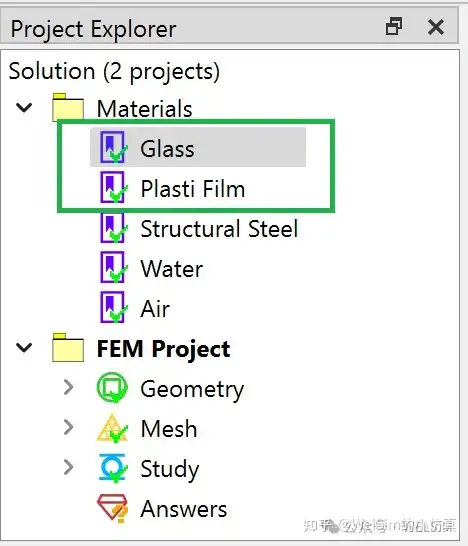
  2. Add two material objects, named Glass and Plastic Film, respectively.

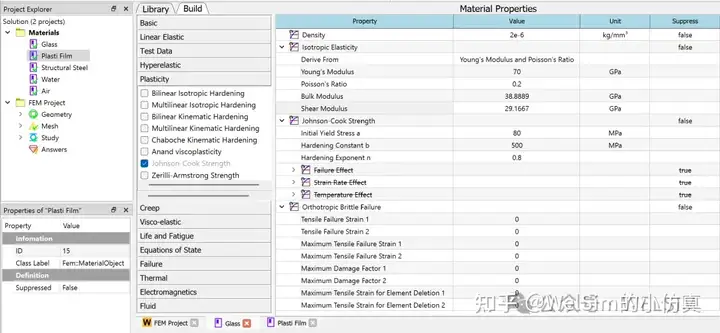
3. Double-click the Glass material object to enter the editing mode. Enter the initial density of 2.5e-6 kg/mm³, Young’s modulus of 70 GPa, Poisson’s ratio of 0.2, plastic yield stress of 80 MPa, hardening parameter of 500 MPa, and hardening exponent of 0.8. Add Orthotropic Brittle Failure properties with the default parameters set to 0.

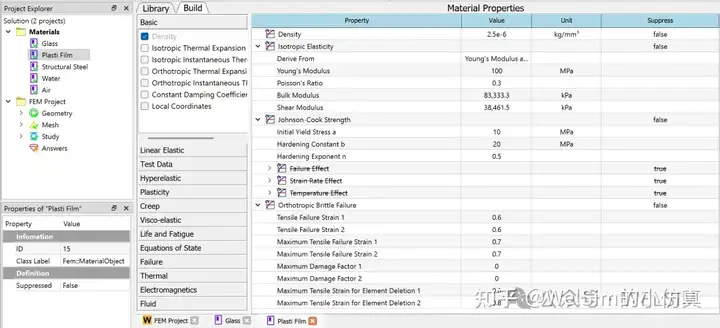
4. Double-click the Plastic Film material object to enter the editing mode. Enter the initial density of 2.5e-6 kg/mm³, Young’s modulus of 100 MPa, Poisson’s ratio of 0.2, plastic yield stress of 10 MPa, hardening parameter of 20 MPa, and hardening exponent of 0.5. Add orthotropic brittle failure properties with strain at the beginning of tensile failure set to 0.6, maximum tensile strain set to 0.7, and the maximum tensile strain for element deletion set to 0.8.

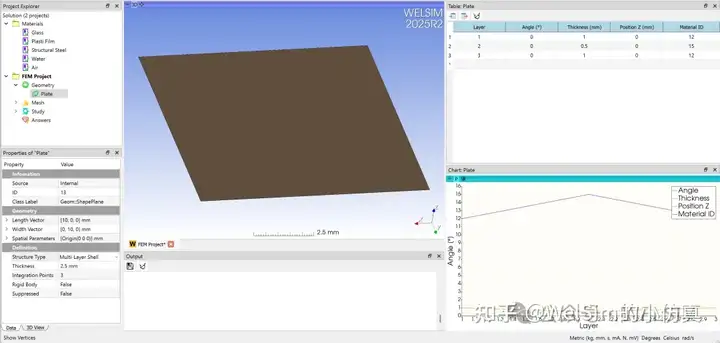
5. Add a plane shape to represent the shell structure. Users can also import a real shell structure. In the properties window, set the Structural Type to Multi-Layer Shell structure.

6. Once the Structural Type is set to Multi-Layer Shell, the table window is activated to edit layer data. This allows users to define the number of layers, angle, thickness, Z position, and materials for each layer. Here, a total of three layers are defined, with thicknesses of 1 mm, 0.5 mm, and 1 mm, and materials of Glass, Plastic Film, and Glass, respectively.

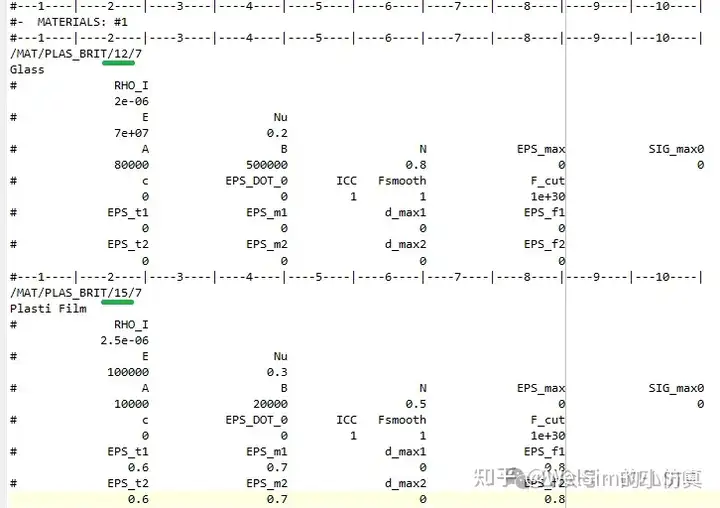
7. At this point, the multi-layer shell structure is defined and ready for subsequent analysis and computation. For example, an OpenRadioss input script can be generated to view the input layer data. As shown in the picture below, the material information and multi-layer shell structure properties are fully defined for solver.

Conclusion

This blog demonstrates the definition of a multi-layer shell structure and the associated material properties. This is the first step in composite material analysis. WELSIM makes it easy and quick to define multi-layer structures. This feature has been implemented in the 2025R2 development version and will continue to be optimized in future versions.

WelSim and the author is not directly associated with or the OpenRadioss development team or institutions. OpenRadioss is cited here only as a reference for the technical blog article and software usage.

定义有限元分析中,复合材料的多铺层结构

现代结构分析中,常常会遇到多铺层复合材料。这些复合材料常常以板壳的整体结构形式出现,内部由多层铺层叠加而成。铺层的角度,厚度,材料都有可能不同。对于这种符合材料的分析,仿真软件需要提供相关的功能,由用户根据实际材料输入数据。

WELSIM复合材料的参数输入提供了简洁的方式。本文介绍定义复合材料的步骤。

1. 新建一个FEM工程。

2. 添加两个材料节点,分别命名为玻璃Glass,和塑性薄膜Plastic Film。

3. 双击玻璃材料节点,进入编辑模式。输入初始密度 2.5e-6 kg/mm3, 杨氏模量70GPa, 泊松比0.2,塑性屈服应力80MPa, 硬化参数500MPa,硬化指数0.8。并添加正交各项异性脆性失效属性,保持默认参数为0。

4. 双击塑性胶片材料节点,进入编辑模式。输入初始密度 2.5e-6 kg/mm3, 杨氏模量100 MPa, 泊松比0.2,塑性屈服应力10MPa, 硬化参数 20MPa,硬化指数0.5。添加正交各项异性脆性失效属性,拉伸失效应变为0.6,最大拉伸应力为0.7,单元删除最大拉伸应变为0.8。

5. 添加一个平面模型,用于表示板壳结构。用户也可以导入一个真实的板壳模型。并在属性窗口中将结构类型设置为多层壳体结构。

6. 当结构类型设置为多层壳体后,表格窗口被激活用于编辑层信息。支持用户定义,层数,铺层角度,铺层厚度,铺层位置高度,和每个铺层的材料。这里定义一共3个铺层,每层的厚度分别是,1 mm, 0.5 mm, 1 mm,材料分别是玻璃,塑性胶片,和玻璃。

7. 至此,多铺层板壳结构就定义完成了。可以用于后续的分析与计算。如可以生成OpenRadioss的输入文件,查看输入的铺层数据。如下图所示,材料信息和铺层板壳结构属性都定义完整。可以用于求解器的计算。

总结

本文演示了多铺层板壳结构的定义,和相关材料属性的定义。这是复合材料分析的第一步。WELSIM可以方便快速的定义多铺层结构。此功能已经在2025R2开发版中实现,会在以后的版本中不断优化。

WelSim与作者和OpenRadioss开发团队与机构没有直接关系。这里引用OpenRadioss仅用作技术博客文章与软件使用的参考。

Tuesday, February 25, 2025

超弹橡胶衬垫的多载荷步瞬态动力学分析

在瞬态动力学分析中,常常需要用到多载荷步分析。本文将从实际操作,演示如何使用WELSIM对超弹材料进行多载荷步的瞬态有限元分析。

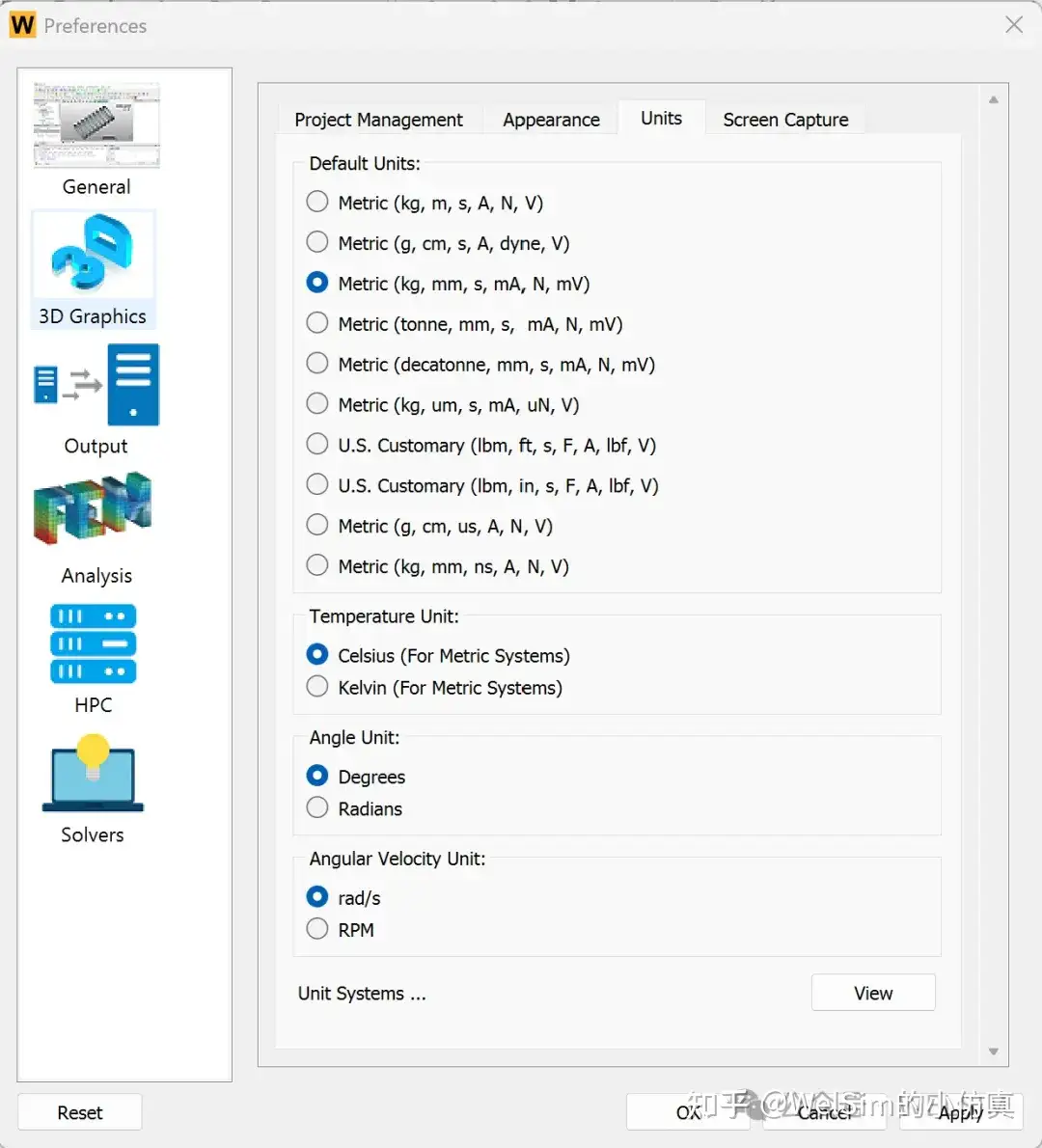
1. 打开WELSIM软件,点击首选项,设置当前单位制为kg-mm-s。

2. 建立一个新的有限元分析FEA项目。

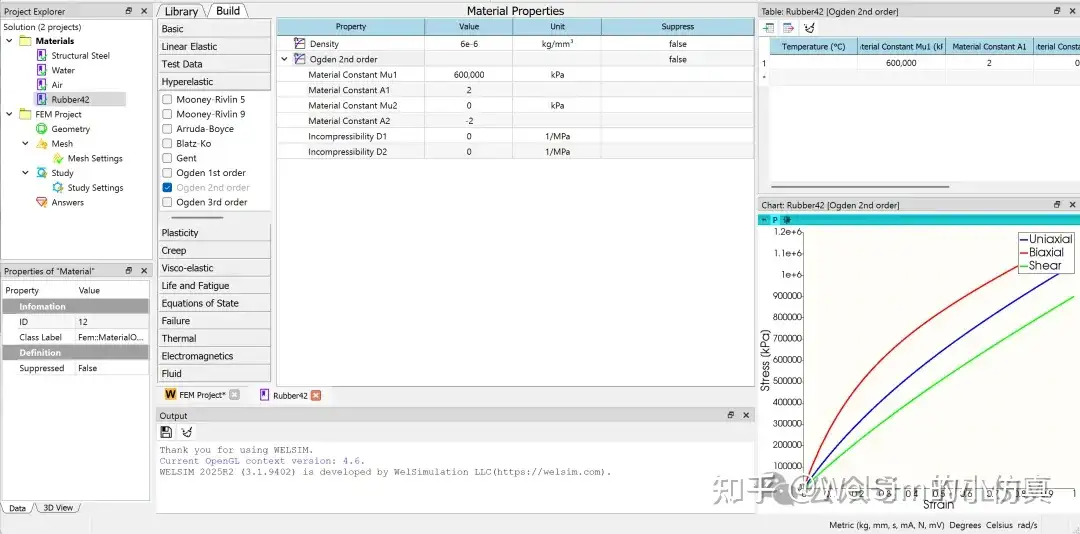
3. 添加一个新的材料节点,并命名为Rubber42。双击此材料节点,进入编辑模式。分别添加密度和Odgen2超弹材料属性。设置密度为6e-6 kg/mm3,Odgen2超弹材料参数分别设置为Mu1=600,000 kPa, A1=2, Mu2=0, A2=-2。在图表窗口会显示相应的应力-应变曲线。

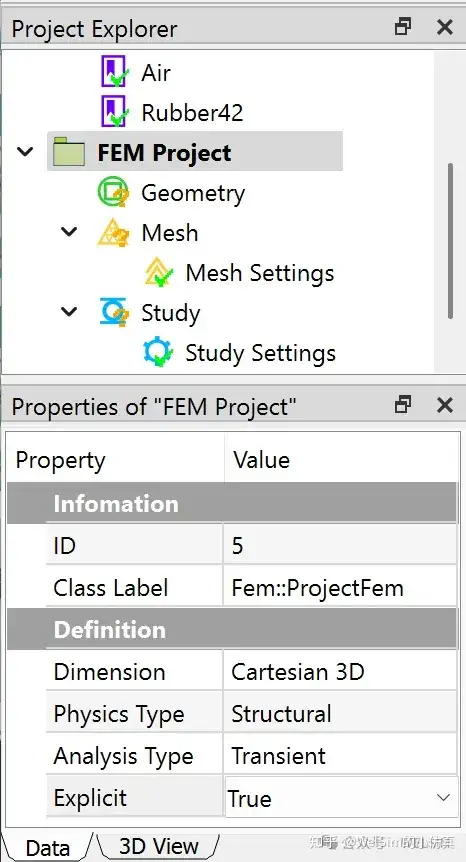
4. 编辑完材料后,关闭材料编辑窗口。点击FEM项目节点,修改属性为显式动力学结构分析。

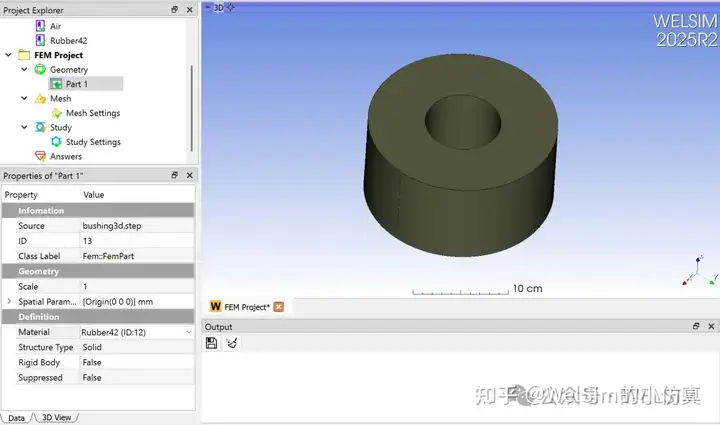
5. 导入事先准备好的衬套几何模型(bushing3d.step)。并将材料设置为刚刚建立的超弹材料Rubber42。

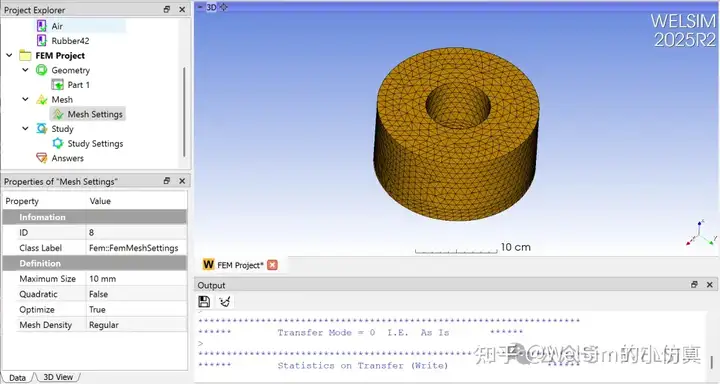
6. 点击网格设置节点,将最大单元尺寸设置为10mm。点击网格划分按钮,网格会很快自动生成。

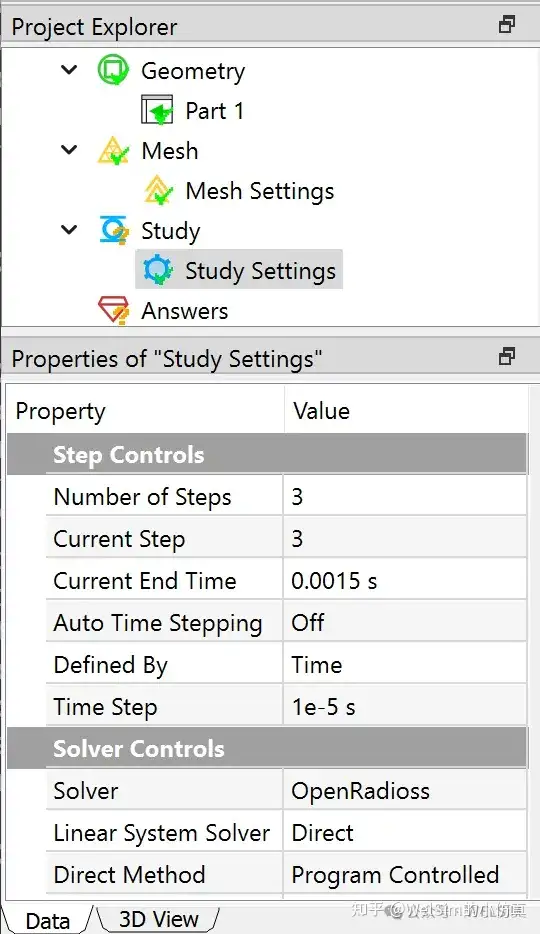
7. 点击模型分析设置节点,在属性窗口中,将载荷步设置为3,并将每个载荷步的时间分别设置为0.0005秒, 0.001秒, 0.0015秒。将时间步设置为1e-5秒。

双击分析设置节点,可以在新窗口中看到每个载荷步的时间设置。

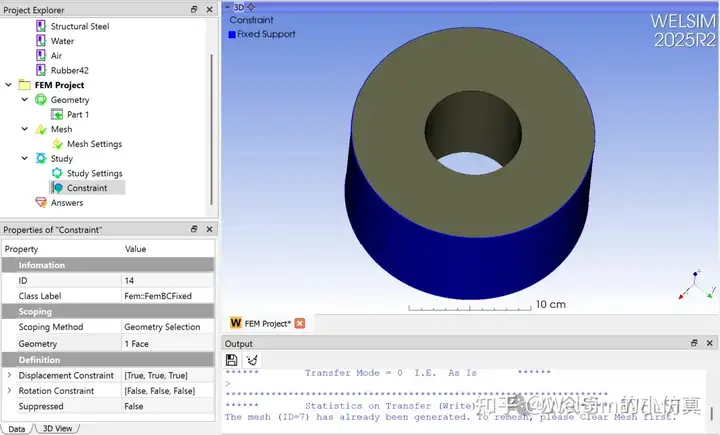
8. 定义完分析设置后,开始添加边界条件。先添加一个固定位移边界条件。并选择衬套的外边界为固定边界。

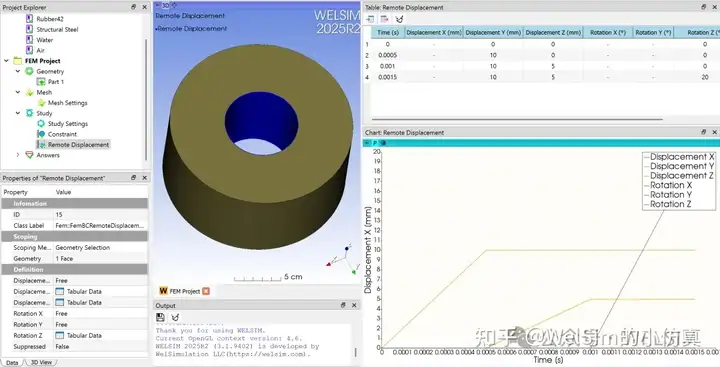
9. 添加一个远程位移边界条件(Remote Displacement)。并选择衬套的内边界为施加边界。由于是多载荷步分析。需要用表格来定义每一步的远程位移值。本算例将Y和Z方向的位移,和绕Z轴方向的转动设为表格。同时在表格窗口直接编辑位移参数,Y方向的位移分别是10, 10, 10, Z方向的位移分别是0, 5, 5, 绕Z轴方向的转动分别是0, 0,20度。

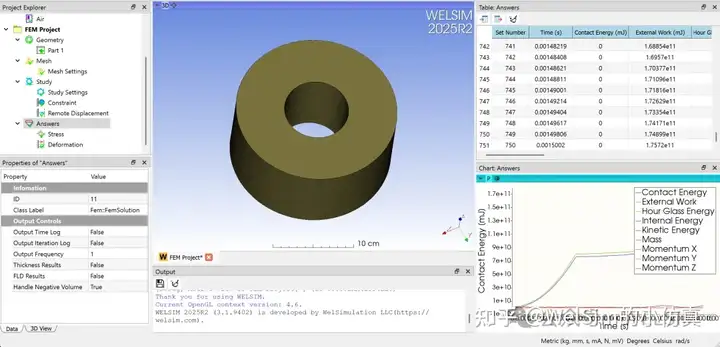
10. 分析设置的定义已经完成。只需要点击计算按钮,就会调用求解器进行计算。(用户需要在首选项中连接外部求解器OpenRadioss)。计算完成后,点击结果节点,可以在表格与曲线窗口,查看基于时间变化的各种变量,如能量,质量,动量等。

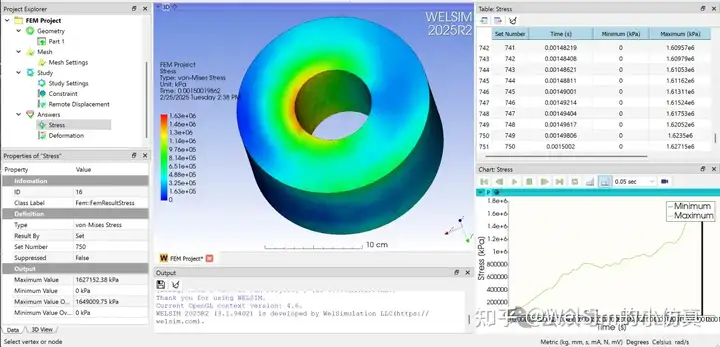
11. 添加应力结果,并查看。

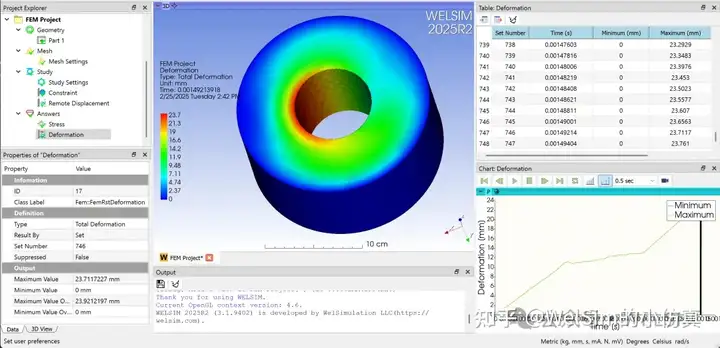
12. 添加位移结果,并查看。

13. 用户还可以添加其他结果,如应变,速度,加速度等结果。

14. 如果需要生成动画视频文件,可以点击曲线窗口上的录像图标。生成当前结果节点的动画视频。


本算例演示了如何使用WELSIM进行多载荷步瞬态动力学分析。已经保存在自动化测试算例中(文件名为12010_or_bushing_multistep.xml)。初次使用WELSIM的用户,需要在首选项中配置OpenRadioss的本地连接。

WelSim与作者和OpenRadioss开发团队与机构没有直接关系。这里引用OpenRadioss仅用作技术博客文章与软件使用的参考。

Wednesday, January 15, 2025

WELSIM has released the 2025R1, supporting molecular dynamics analysis


The general engineering simulation software WELSIM has released the latest 2025R1 version (internal version 3.0). Compared to the previous version, the 2025R1 version includes many new features and enhancements, providing better support for various types of engineering simulation CAE analyses, especially with the addition of molecular dynamics analysis capabilities.

Support for the Molecular Dynamics Solver LAMMPS

The new version adds pre- and post-processing modules for the LAMMPS solver. Users can quickly generate the input scripts required for LAMMPS computation and can also directly call LAMMPS program through WELSIM for solving.

Currently, 36 commands are supported, covering approximately 36% of all LAMMPS commands, and all of these are core commands, which can meet the needs of general analyses.

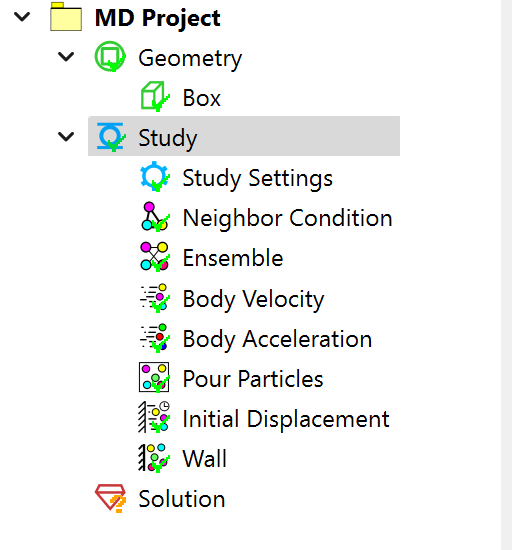
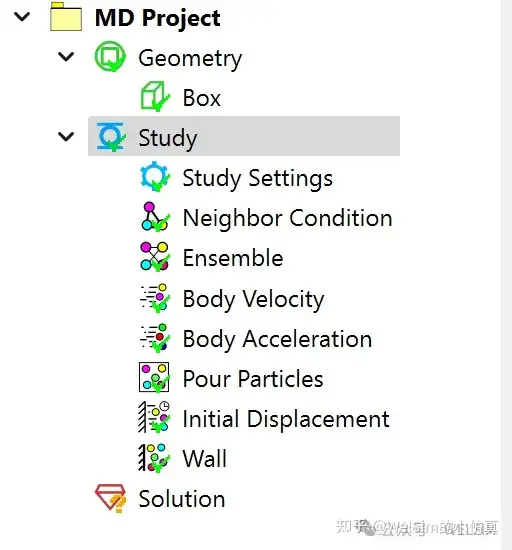
In the pre-processing module, a molecular dynamics project option has been added, along with various conditions such as particle neighbor conditions, particle velocity, particle acceleration, initial displacement, boundary walls, force fields, etc. These pre-processing objects and properties are intuitive and easy to use.

The solving feature is consistent with the finite element solving method. During the computation, the solver’s output information is displayed in a pop-up window, allowing users to monitor the calculation status.

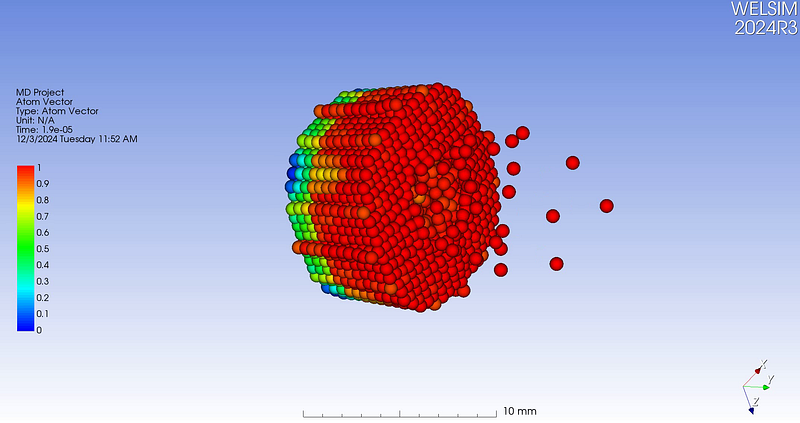
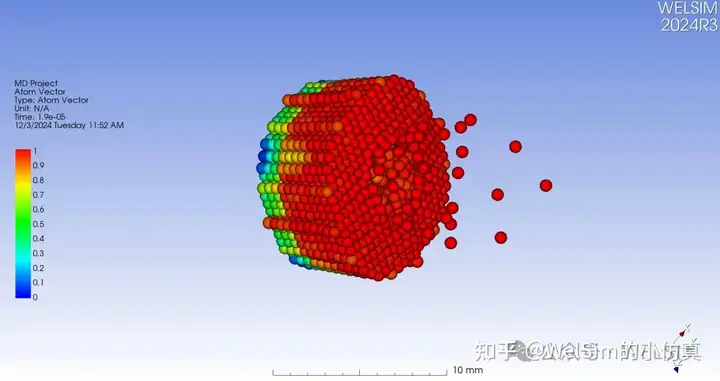
In terms of post-processing, WELSIM also supports some molecular dynamics-related features. It can read the log file (log.lammps) and result files (dump.lmps) generated by LAMMPS solver and display the results. The newly added particle display module can efficiently render particle trajectories and colors.

Enhancements and Upgrades

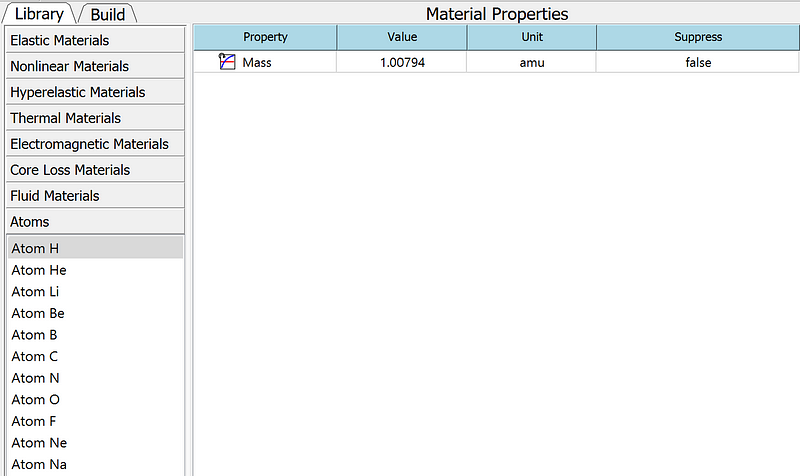
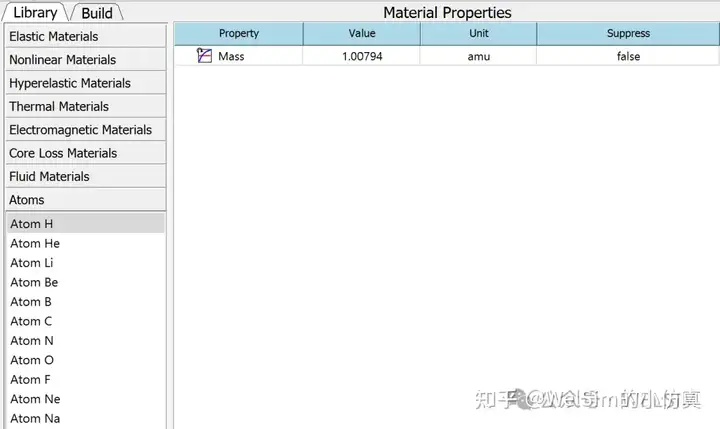
Additionally, the new version includes other new features and improvements. It supports the 3DConnexion 3D space mouse hardware and the export of result files in TecPlot format. It also adds atomic mass units and basic atomic materials such as H, He, Li, Be, B, C, N, O, F, Ne, and Na.


WELSIM and the author are not affiliated with LAMMPS, TecPlot, or 3DConnexion. The use of LAMMPS, TecPlot, and 3DConnexion is for reference in this technical blog post and software usage only.

Tuesday, January 14, 2025

WELSIM发布2025R1版本,支持分子动力学计算

通用工程仿真分析软件WELSIM发布了最新的2025R1版本(内部版本号3.0)。相对于上一个版本,2025R1版本含有许多新的功能与增强,能够更好地支持各种类型的工程仿真CAE分析,尤其是增加分子动力学分析计算功能。

新增支持开源求解器LAMMPS

新版本增加了LAMMPS求解器的前后处理模块,用户可以快速的生成LAMMPS计算所需的输入文件,也可以直接通过WELSIM调用LAMMPS进行求解。

目前已经支持了36个命令,占LAMMP全部命令的36%左右,且全部为核心命令,能满足常用的分析。

在前处理功能上,增加了分子动力学项目,和各种条件,如粒子关系条件,粒子速度,粒子加速度,初始位移,边界墙,力场定义等等。这些前处理节点和属性,直观且易于使用。

求解功能和有限元计算方式一致,计算时,会在弹出窗口中现实求解器的输出信息,便于用户了解计算状态。

在后处理方面,WELSIM也已经支持了部分分子动力学相关的功能。可以读取LAMMPS计算生成的log文件log.lammps,以及计算结果文件dump.lmps。并显示计算结果。新增的粒子显示模块,可以高效率的渲染粒子的轨迹变化与颜色。

其他增强与升级

此外,新版本还有其他新功能与提升。如支持3DConnexion的三维空间鼠标硬件,支持导出TecPlot格式的结果文件。此外还增加了原子质量单位,增加了基础原子材料如H, He, Li, Be, B, C, N, O, F, Ne, Na。


WelSim与作者不隶属于LAMMPS, TecPlot, 3DConnexion。和以上开发团队与机构没有关系。这里引用LAMMPS,TecPlot和3DConnexion 仅用作技术博客文章与软件使用的参考。

Monday, January 13, 2025

Use WELSIM to generate LAMMPS solver input scripts

 LAMMPS (Large-scale Atomic/Molecular Massively Parallel Simulator) is an excellent general-purpose molecular dynamics open-source computational software, based on the GPL license. It is primarily used to simulate systems of atoms, molecules, and macroscopic particles and can run on both Windows and Linux operating systems. It was developed by the Sandia National Laboratories and is suitable for research in various fields, ranging from materials science to biophysics. The solver supports a rich set of force fields, many atomic types, excellent computational performance, parallel and GPU computing support, and can calculate various complex microscopic models. LAMMPS is widely used in academia and industry. The latest version is 2024August29, and the project team has made the full code open-source, while also providing compiled executables and numerous examples.

The LAMMPS solver input script format is simple and clear, similar to most finite element analysis solver formats, making it easy to learn. The file extension can be arbitrary, but *.in is commonly used. The input file controls various parameters, including analysis type, computing region, force fields, boundary conditions, and initial conditions. Additionally, the input script can read external files, such as a separate molecular data file. This is similar to finite element input script, where large mesh files are separated and read independently. The difference is that LAMMPS’ molecular files contain information like atomic coordinates, masses, molecular bonds, bounding boxes, etc.

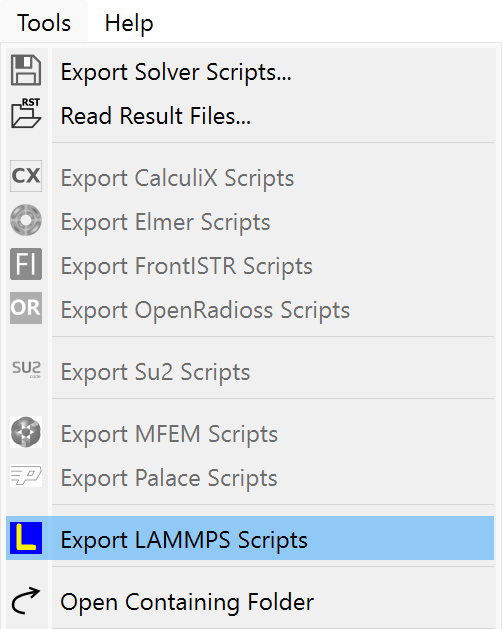
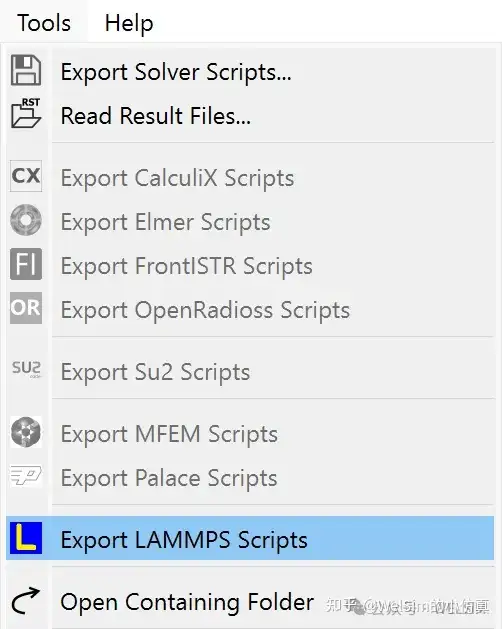
To better support the open-source solver and simulation community, WELSIM has recently added support for LAMMPS pre- and post-processing. Users can quickly generate LAMMPS input files for simulations. After defining the model, users can select “Output LAMMPS Files” from the Tools menu to generate solver files in a specified directory.

After a successful export, a solver input file named lammps_welsim.in will be generated, which can directly be used for molecular dynamics simulations.

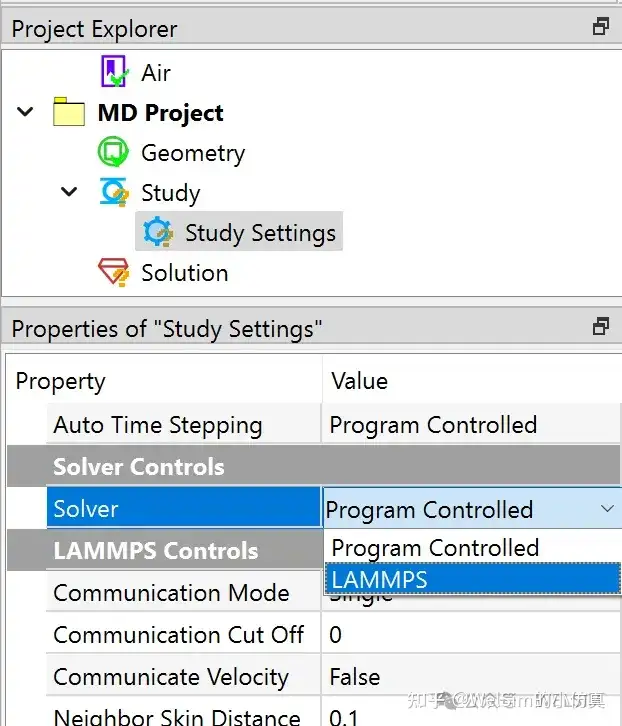
At the same time, WELSIM can directly call LAMMPS executable program to solve the generated scripts. After downloading the LAMMPS solver, users can configure the solver executable path (lmp.exe) via Preferences — Solver — LAMMPS executable file. After defining the model, users can solve the problem and obtain result files.

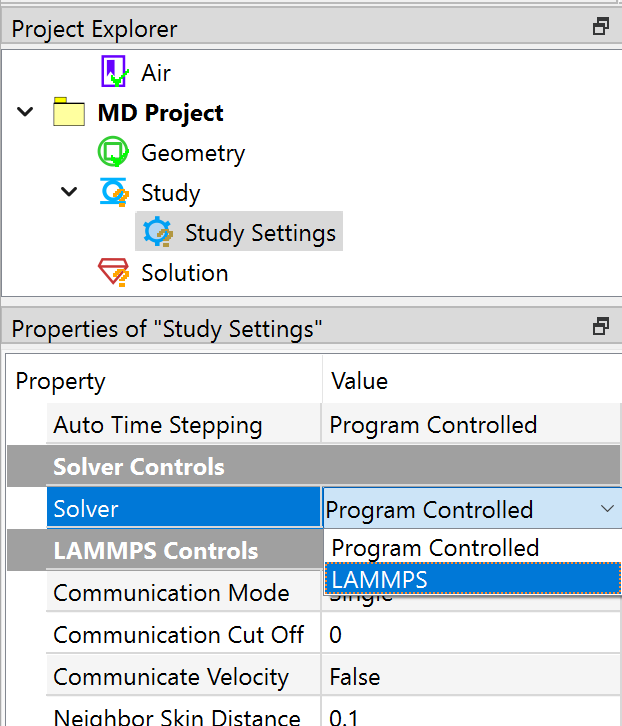
Since LAMMPS is the default molecular dynamics solver, there is no need to set the solver properties in the Study Settings when performing joint solving.

Supported Commands

The latest version of LAMMPS includes nearly 100 general commands, and WELSIM has currently supported 36 commands, which account for 36% of the total, all of which are core commands and meet most common analysis needs. The supported commands are as follows:

atom_modify, atom_style, boundary, comm_modify, comm_style, compute, compute_modify, create_atoms, create_bonds, create_box, dimension, displace_atoms, dump, dump_modify, echo, fix, group, include, lattice, log, mass, neigh_modify, neighbor, newton, pair_coeff, pair_modify, pair_style, region, run, special_bonds, thermo, thermo_modify, thermo_style, timestep, units, velocity.

More solver commands will be added with version updates and user needs.

Post-Processing of Molecular Dynamics Results

Currently, WELSIM supports some post-processing features related to molecular dynamics. It can read LAMMPS-generated log files (log.lammps) and result files (dump.lmps), and display the results in contour.

Conclusion

This blog introduces how to generate LAMMPS input scripts using WELSIM and how to set up joint solving. Thanks to its excellent GUI, users can quickly generate high-quality LAMMPS input scripts.

LAMMPS is licensed under the GPL open-source protocol, and WELSIM’s installation package does not include the LAMMPS solver. Users need to download the solver separately. With simple configuration, WELSIM can work together with LAMMPS to solve particle problems.

The LAMMPS input file functionality is available in the 2025R1 development version and will continue to be maintained and enhanced in the official and future releases.

WELSIM and the author are not affiliated with LAMMPS and have no connection with the LAMMPS development team or institutions. LAMMPS is referenced here solely for the purpose of this technical blog post and software usage.